Looks fine, wired wrong
AI adds services, edges, or fallbacks that are not in the code.
Archify draws only nodes and links written in the JSON.
The agent reads the code and writes JSON. Archify turns that into HTML. Start from what you need to understand, not from a diagram type.
How it runs
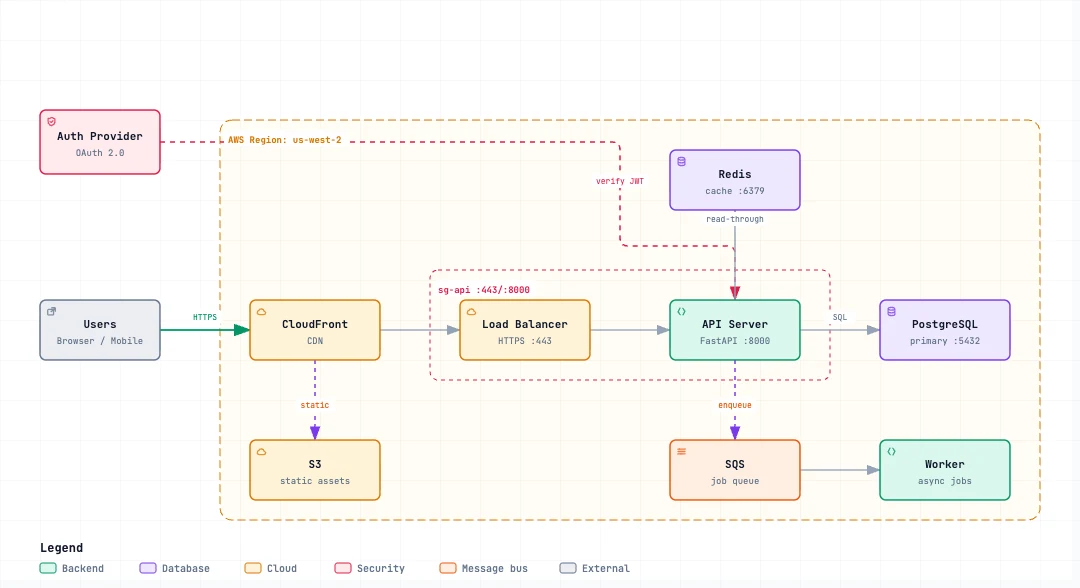
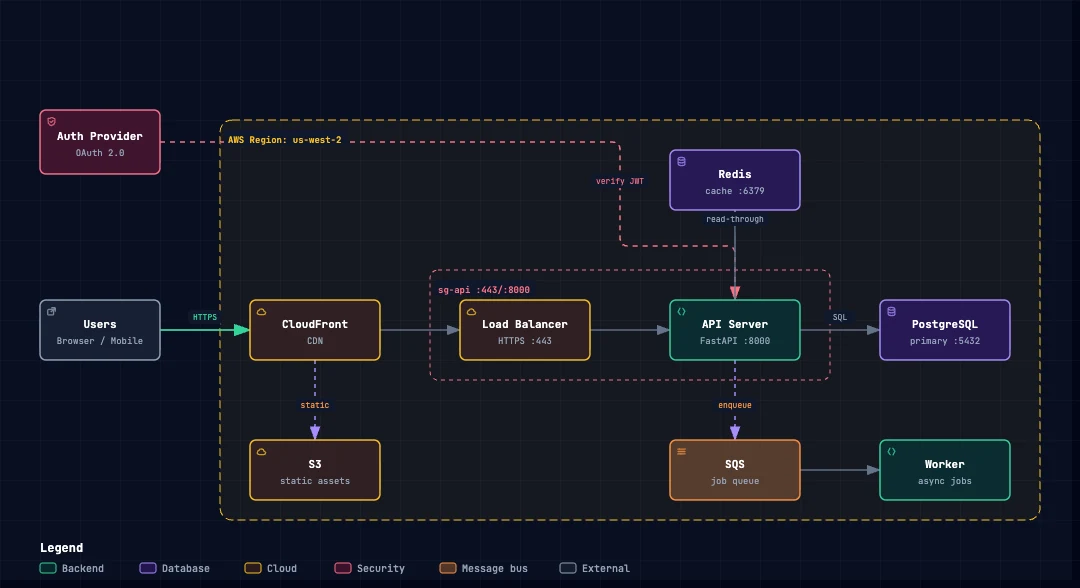
What Archify is
Mermaid, Excalidraw, tech-graph — and most "draw a diagram" prompts — produce a picture. Archify makes the agent write typed JSON, then compiles HTML. The difference: a source you can review, checks, and no invented boxes.
AI adds services, edges, or fallbacks that are not in the code.
Archify draws only nodes and links written in the JSON.
You get a PNG or SVG — nothing to read or diff.
JSON is the source. HTML is just the viewer.
The same prompt yields a new layout and wording.
The same JSON always yields the same diagram.
From question to diagram
What should someone looking at the diagram understand?
Only facts you opened, with a bounded scope.
Typed source of truth.
Check the JSON and the geometry. Fix only the failing piece.
Write the HTML once. On failure the previous file stays.
Captures are evidence, not a pass.
The file you open in a browser to share.
Mental model
AI diagrams often look fine while inventing connections, leaving nothing to review, and drawing a different picture next time. Archify requires typed JSON, then always renders the same artifact.
Chooses scope, main path, authors JSON. No invented services, edges, or fallbacks.
Schema, geometry, identity, atomic delivery, self-contained viewer.
JSON + HTML + receipt. Automated screenshots cannot claim a visual pass.
The diagram source — read, edit, and diff in git.
The file you open in a browser — docs, PRs, slides.
Proof the checks ran — status, hashes, screenshots.
Install
Prefer the project command for a team or CI so everyone shares the same Skill. Use global only when you want Archify on every local repo.

You use Cursor Agent inside the editor.
npx -y skills add tt-a1i/archify --skill archify --agent cursor --global --copy --yesnpx -y skills add tt-a1i/archify --skill archify --agent cursor --copy --yesIf Cursor does not see the Skill yet, start a new Agent session.
# Use the manual CLI only when you can author or inspect JSON
git clone https://github.com/tt-a1i/archify
cd archify/archify
node bin/archify.mjs doctor
node bin/archify.mjs validate architecture examples/web-app.architecture.json --quality showcase --json
node bin/archify.mjs deliver architecture examples/web-app.architecture.json web-app.html --quality showcase --json
node bin/archify.mjs visual-check web-app.html --json
Start from the question
Ask what you need to understand, then pick a sample. Pictures show the output. Write the prompt from your code — do not copy the sample layout.
What exists, how it connects, which boundaries matter?
Not for you need exact call order — use Sequence.
Which actors, decisions, approvals, retries?
Not for you need stored states of one object — use Lifecycle.
In one call, who calls whom first, and what returns?
Not for you need a topic/queue map — use Dataflow.
Where data comes from, how it changes, who uses it?
Not for you need a timeline or who owns each task.
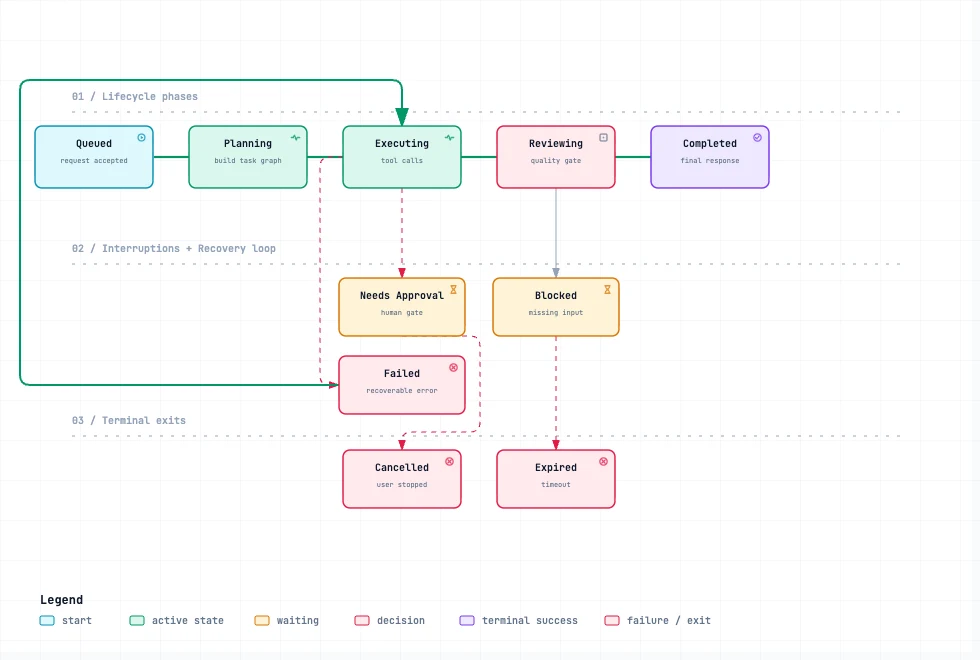
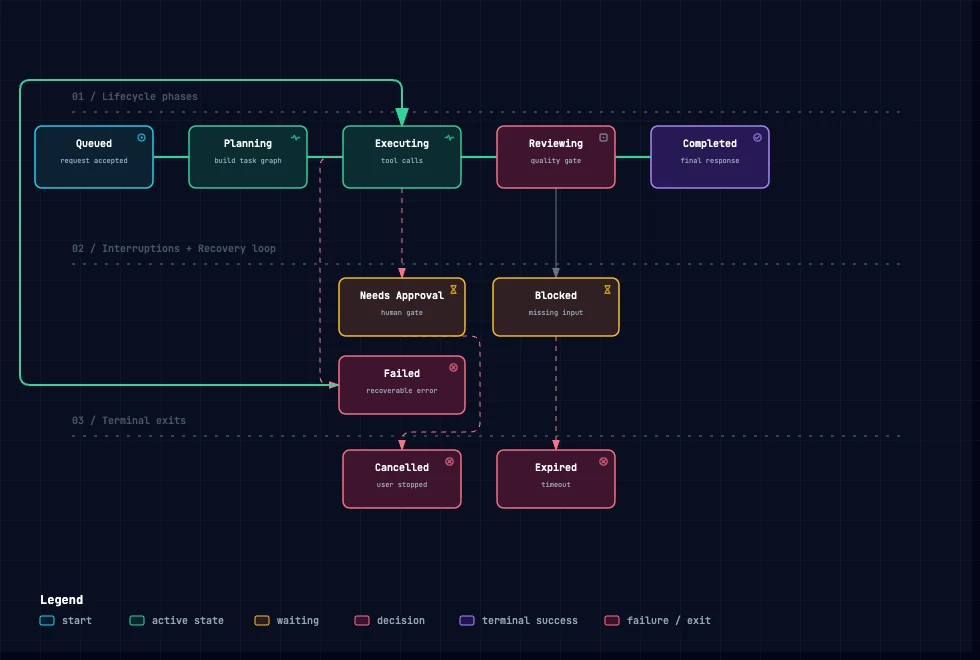
Which states exist, how they transition, how they end?
Not for you only have running steps, no stored state — use Workflow.
Filter by kind of truth
What exists, who owns it, which boundaries matter.
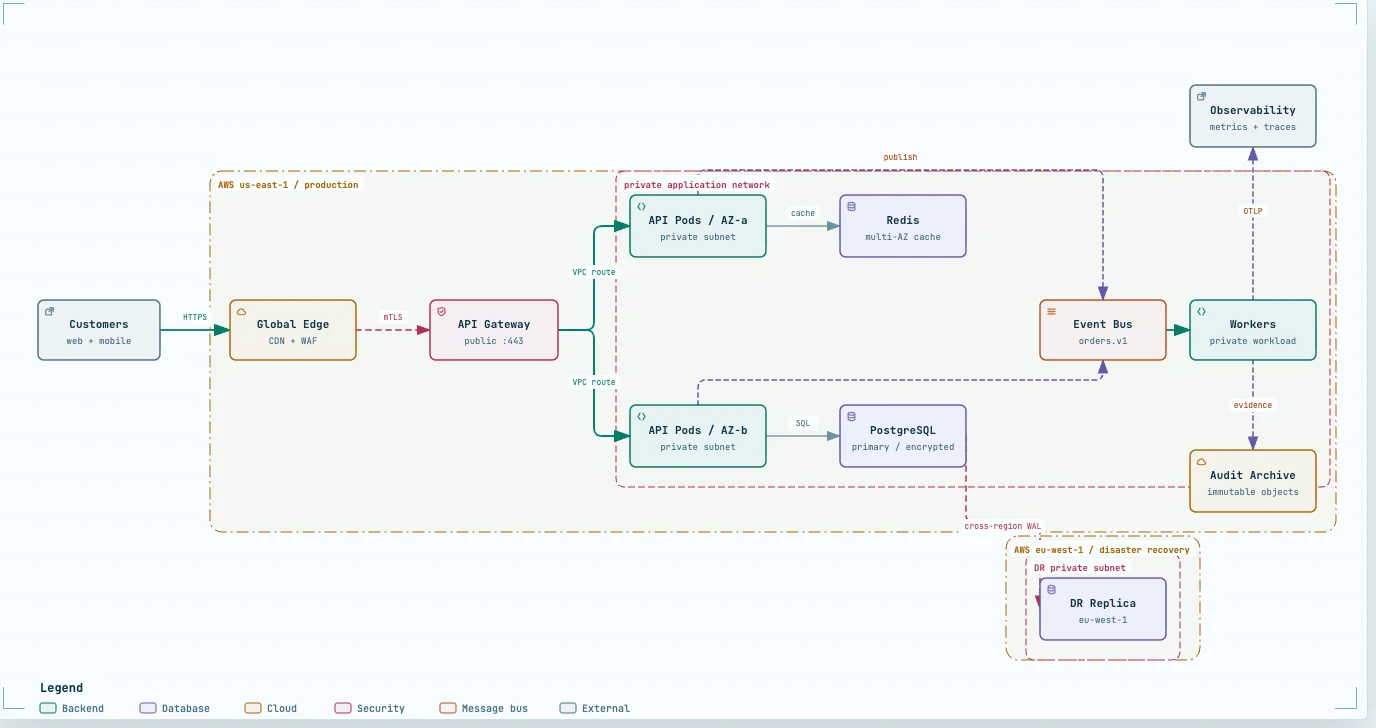
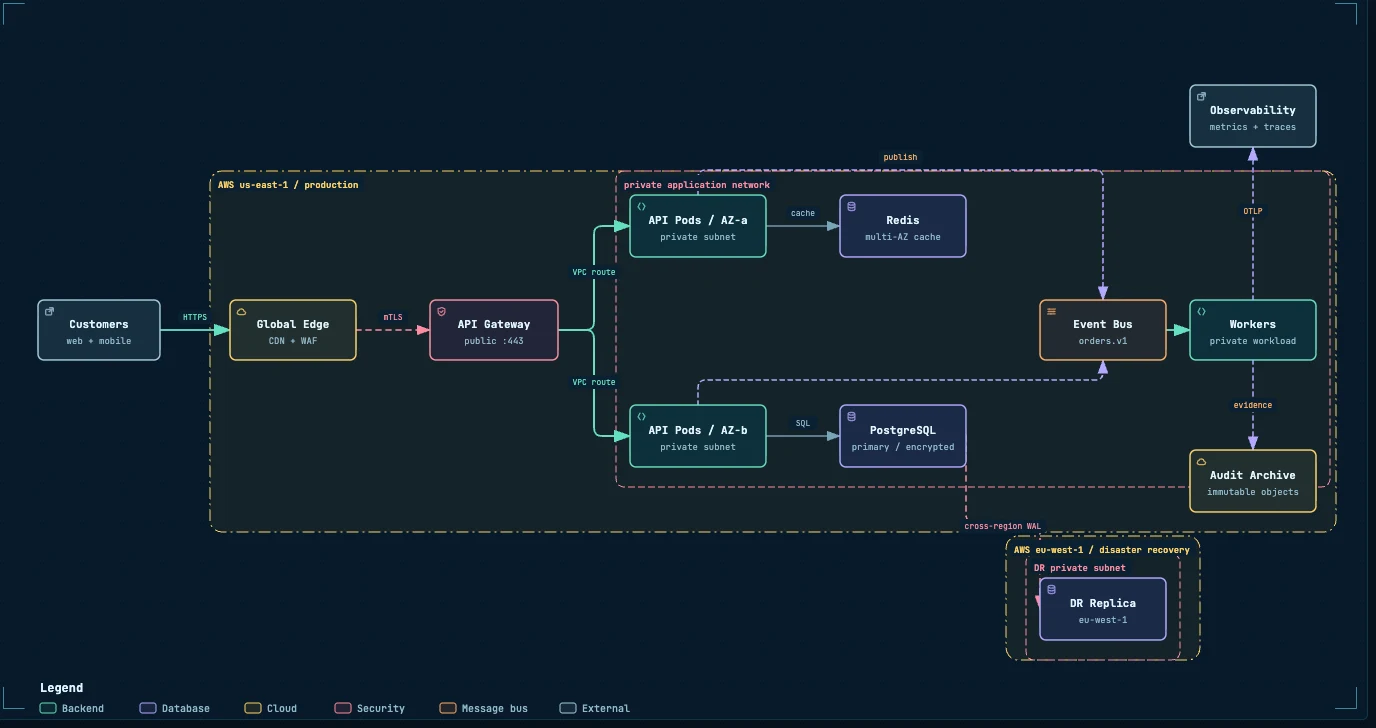
What exists in the system, and how does it connect?
Use when New-repo intake, onboarding, design review.
Don’t use when You need exact call order.
Prompt — edit for your repo
Use Archify in this repo to answer: a new maintainer needs to see which runtime components an input passes through, which dependencies sit outside the process, and what the primary path is.

Inspect the current commit. Cite a file and line range only after you open it. Author typed JSON first: 8–12 primary nodes, one main path, short side branches. Do not copy gallery topology. Validate after every edit. Deliver only after validate passes. Then visual-check; screenshots are evidence, not a passed visual review. Disclose unknowns. Where do workloads run, who owns them, and what crosses the boundary?
Use when Production readiness or infra handoff — only when owner, region, private scope, and crossing mechanism are known.
Don’t use when Local CLI, or deployment facts are missing. This profile fails closed — do not invent regions or security groups.
Prompt — edit for your repo
Use Archify Architecture with deployment ownership only when owner, region, private scope, and crossing mechanism are known facts.

Question: where do workloads run, who owns them, and what is the crossing mechanism?

If facts are missing, stop and report — do not invent them. Inspect the current commit. Cite a file and line range only after you open it. Author typed JSON first: 8–12 primary nodes, one main path, short side branches. Do not copy gallery topology. Validate after every edit. Deliver only after validate passes. Then visual-check; screenshots are evidence, not a passed visual review. Disclose unknowns. Which actors, decisions, approvals, and retries.
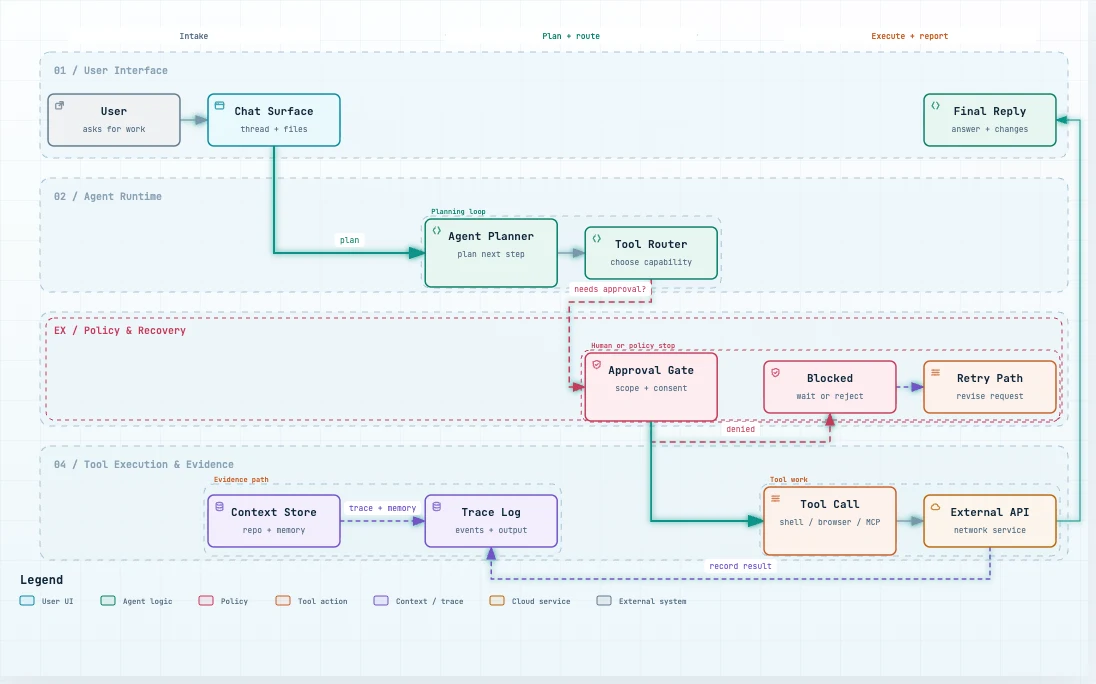
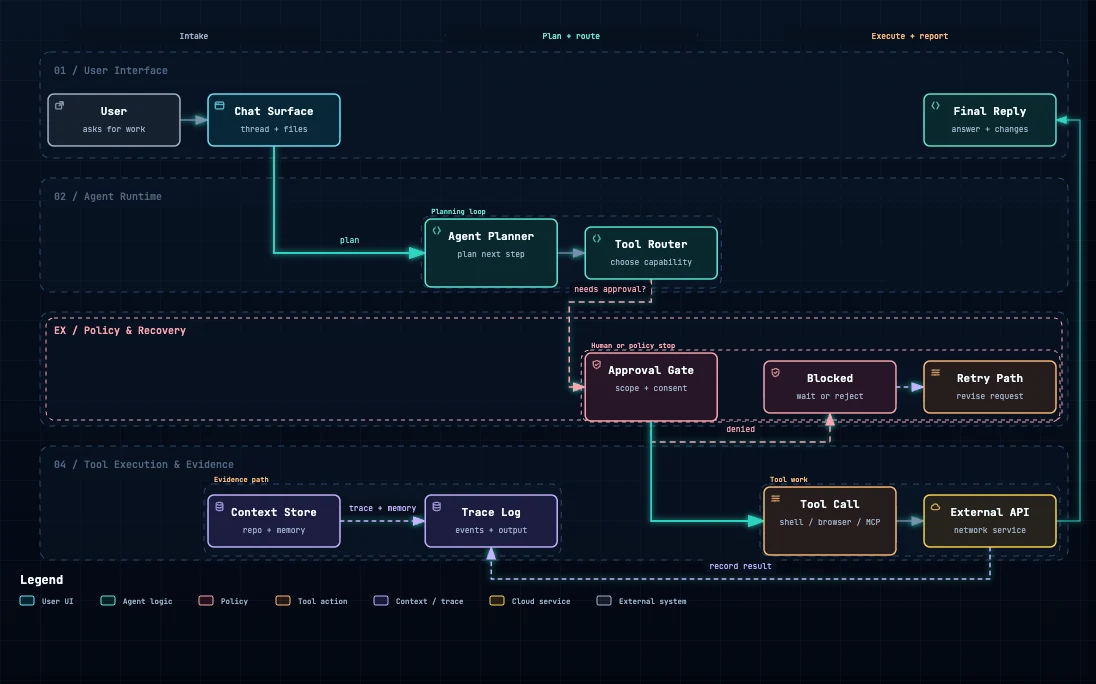
How does the agent plan, ask for permission, call tools, and recover?
Use when Agent runtime, MCP, approval policy.
Don’t use when You only need a static component map.
Prompt — edit for your repo
Use Archify Workflow to answer: how does the agent plan, ask for permission, call tools, and recover?

Lanes by responsibility. One main path. Retries and errors leave the main corridor.

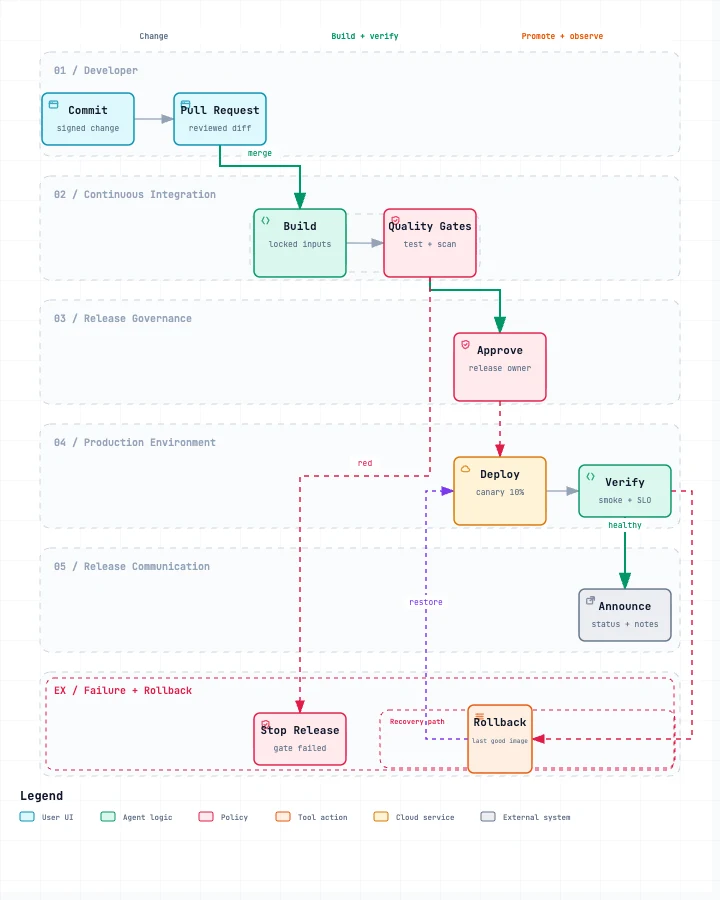
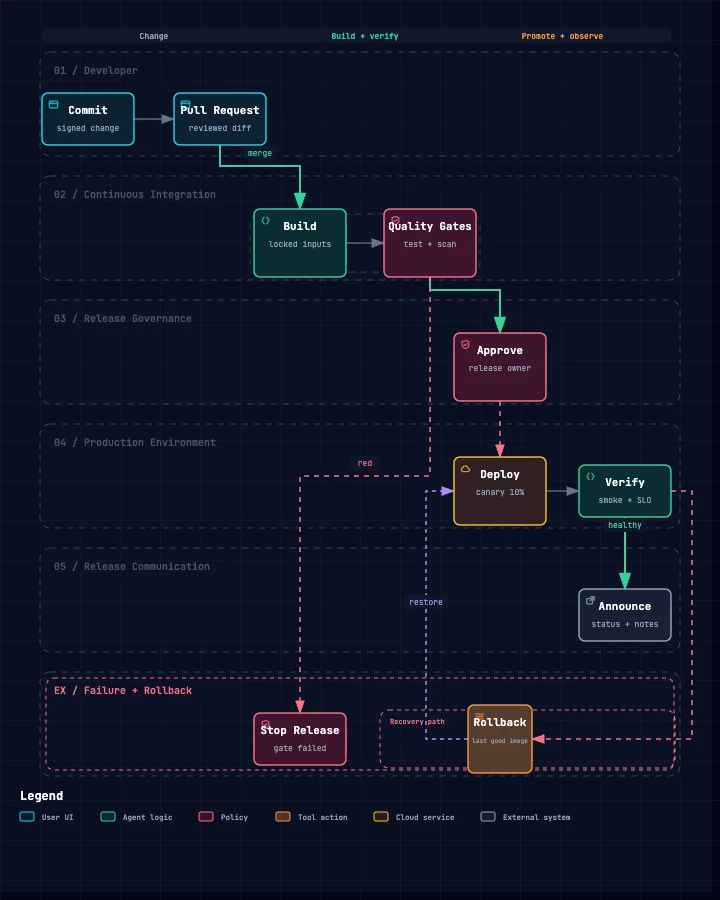
Inspect the current commit. Cite a file and line range only after you open it. Author typed JSON first: 8–12 primary nodes, one main path, short side branches. Do not copy gallery topology. Validate after every edit. Deliver only after validate passes. Then visual-check; screenshots are evidence, not a passed visual review. Disclose unknowns. How does a change go from commit to production?
Use when CI/CD design, release review.
Don’t use when The question is the state of a release object — use Lifecycle.
Prompt — edit for your repo
Use Archify Workflow to answer: how does a change move from commit to production through build, blocking gates, approval, verify, communicate, and rollback?

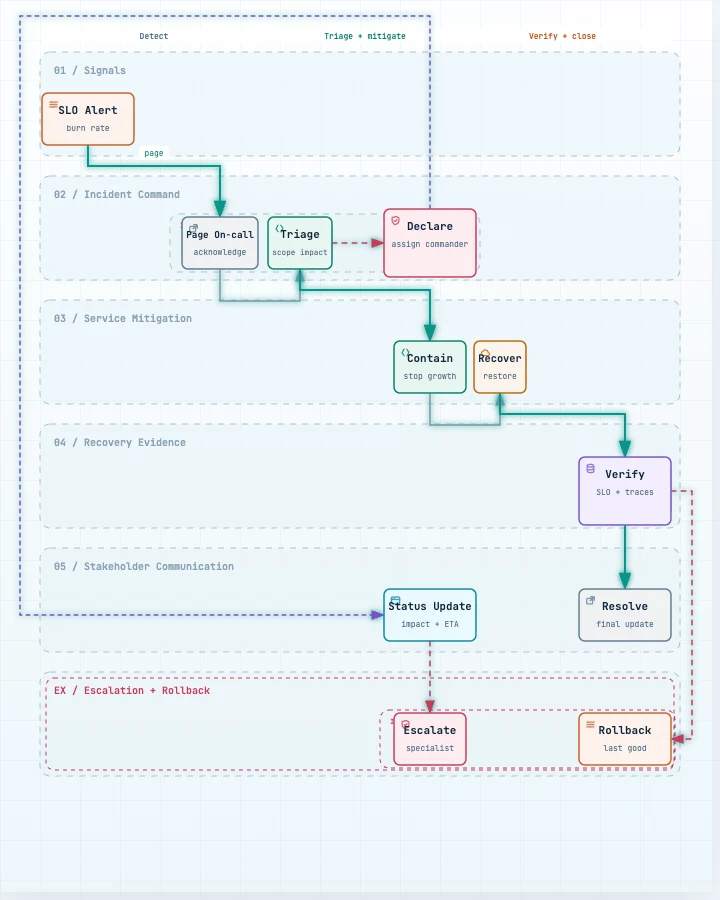
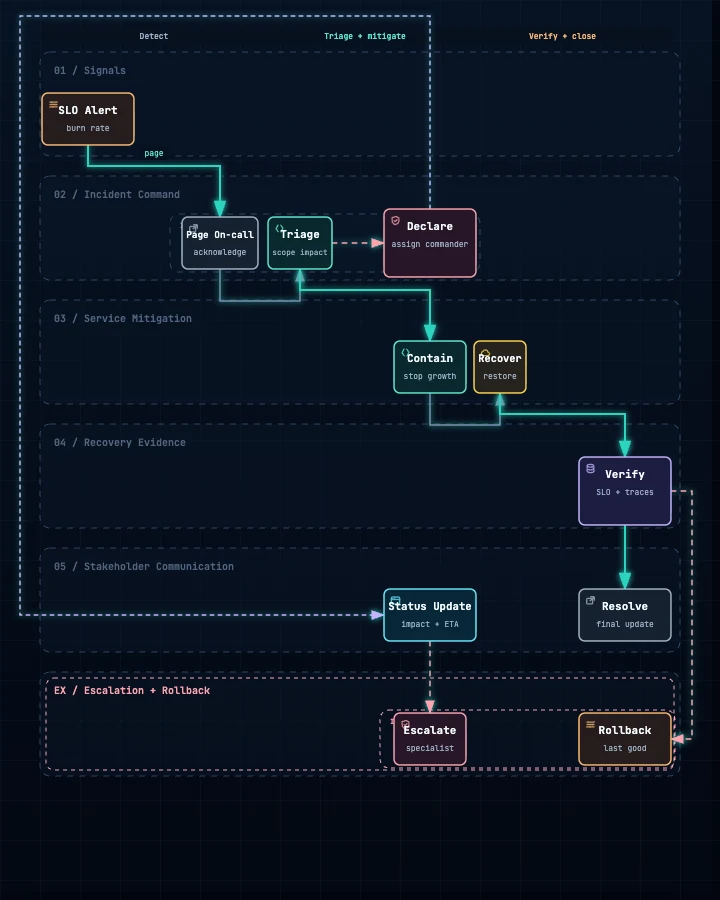
Inspect the current commit. Cite a file and line range only after you open it. Author typed JSON first: 8–12 primary nodes, one main path, short side branches. Do not copy gallery topology. Validate after every edit. Deliver only after validate passes. Then visual-check; screenshots are evidence, not a passed visual review. Disclose unknowns. How do we detect, triage, mitigate, communicate, and verify?
Use when On-call handoff, tabletop exercise.
Don’t use when You need a live monitoring dashboard.
Prompt — edit for your repo
Use Archify Workflow to answer: how do we detect, triage, mitigate, communicate, and verify an incident?

Inspect the current commit. Cite a file and line range only after you open it. Author typed JSON first: 8–12 primary nodes, one main path, short side branches. Do not copy gallery topology. Validate after every edit. Deliver only after validate passes. Then visual-check; screenshots are evidence, not a passed visual review. Disclose unknowns. Who calls whom, in what order, where fallback happens.
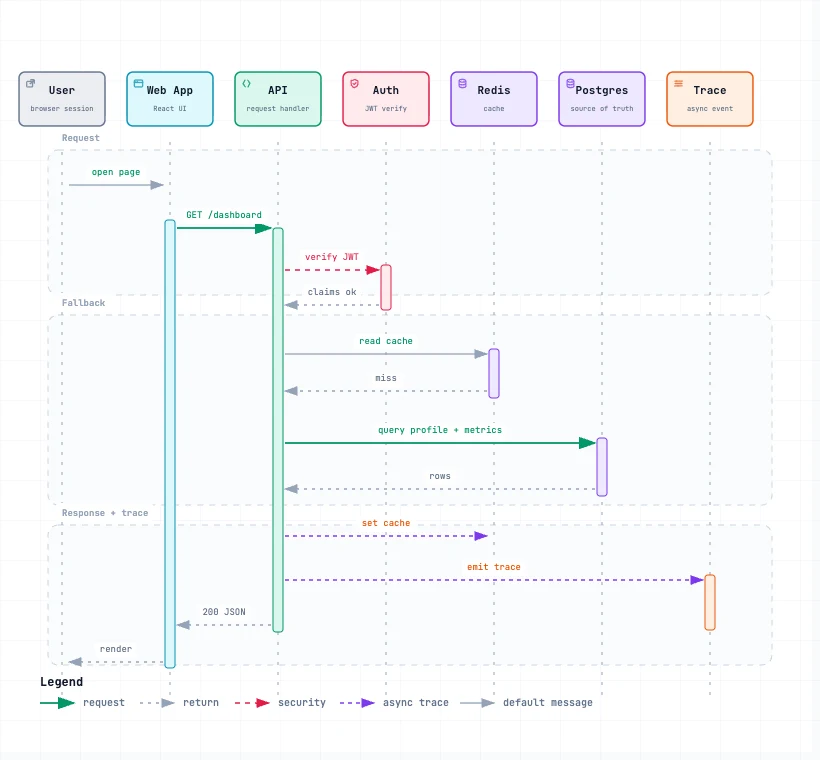
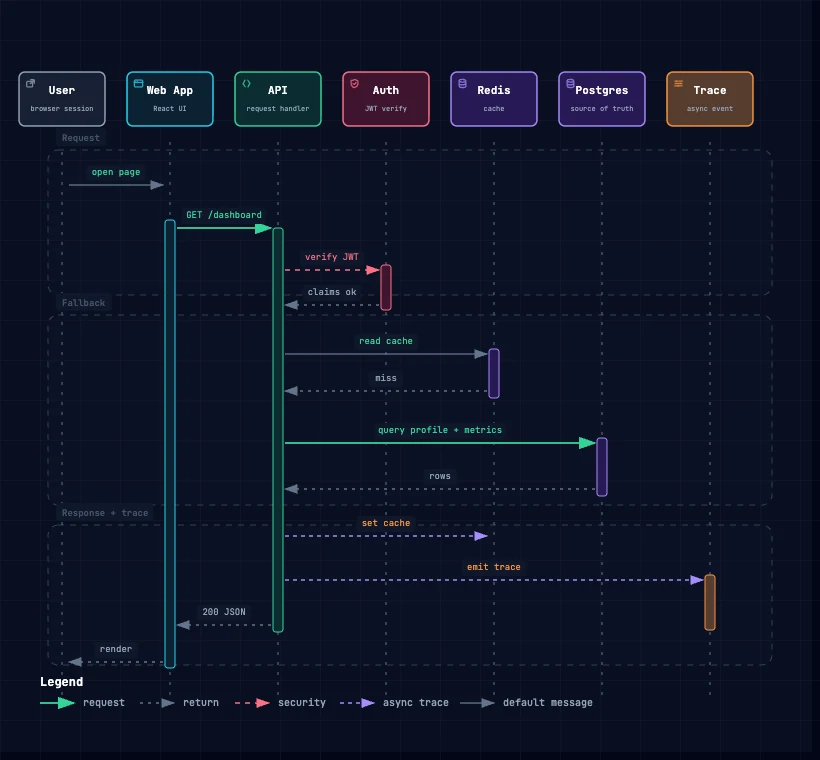
Who calls whom, in what order, and what returns?
Use when API docs, auth or cache debugging.
Don’t use when Order does not matter.
Prompt — edit for your repo
Use Archify Sequence to answer: in one request, which participant calls which participant first, and what returns?

One interaction. Do not turn this into a component map.

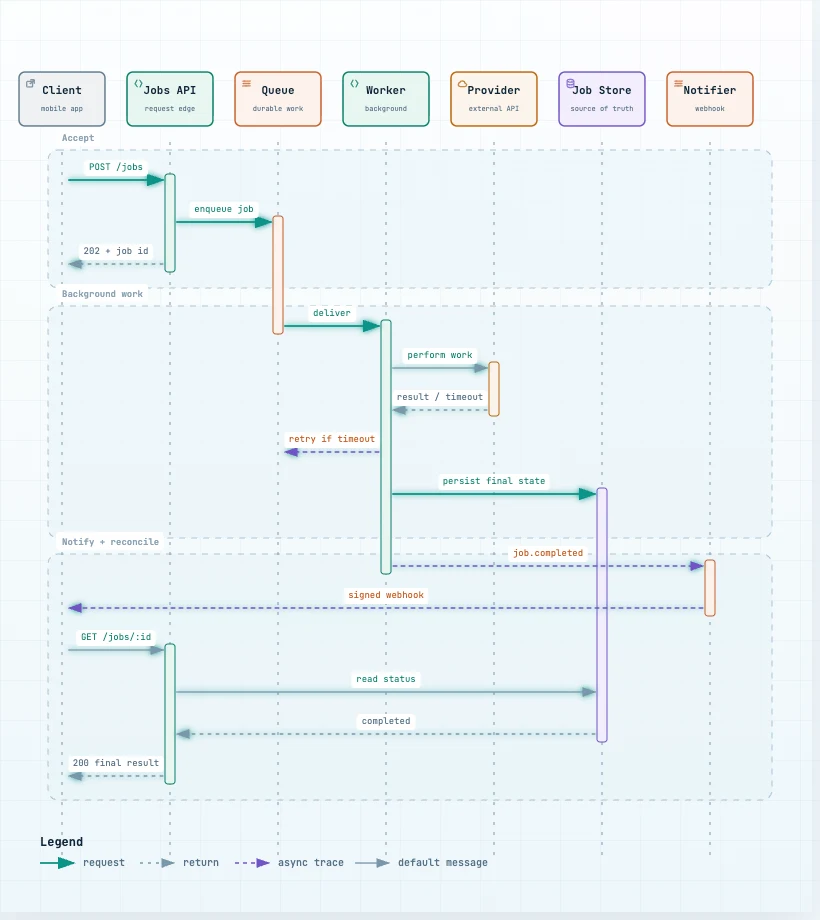
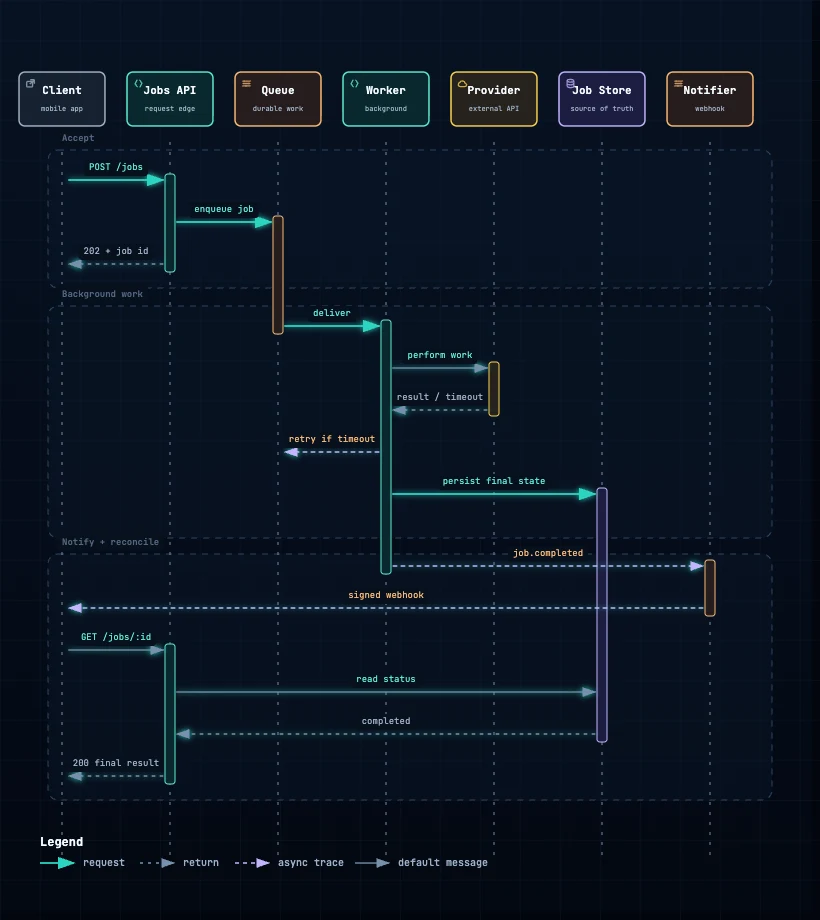
Inspect the current commit. Cite a file and line range only after you open it. Author typed JSON first: 8–12 primary nodes, one main path, short side branches. Do not copy gallery topology. Validate after every edit. Deliver only after validate passes. Then visual-check; screenshots are evidence, not a passed visual review. Disclose unknowns. After the initial ACK, which steps still run?
Use when Jobs, webhooks, callbacks, eventual consistency.
Don’t use when You need a topic/consumer map — use Dataflow.
Prompt — edit for your repo
Use Archify Sequence to answer: after the initial ACK, how do queueing, workers, retry, webhooks, and polling still run?

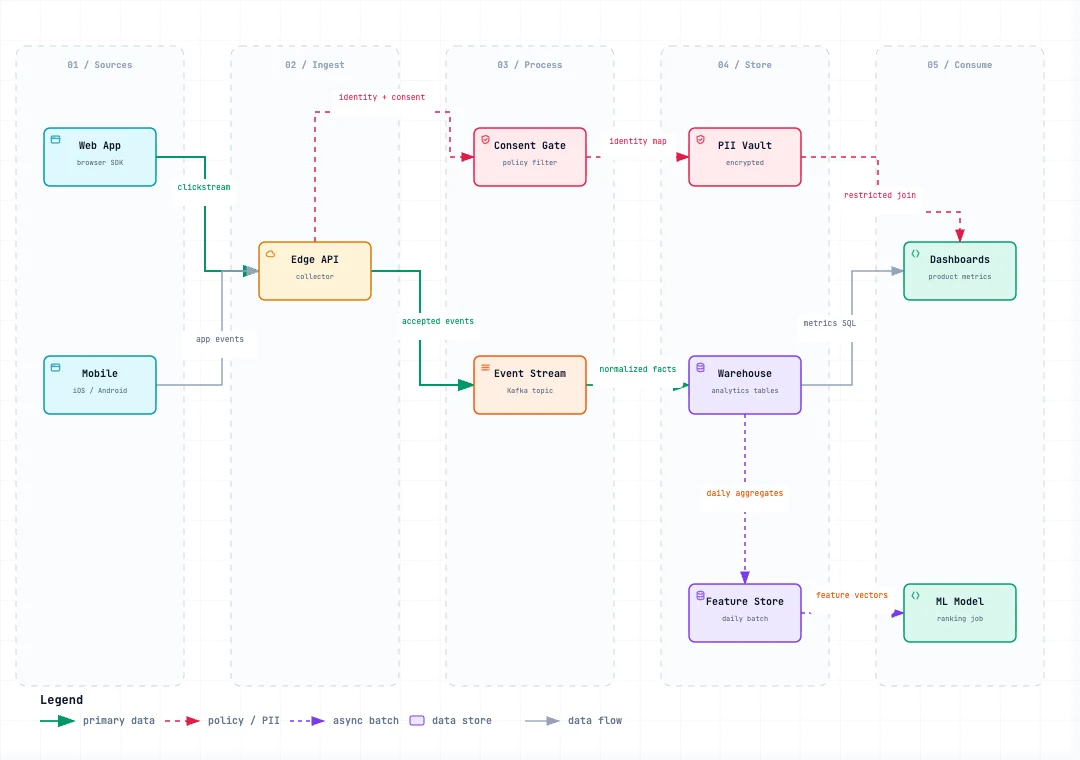
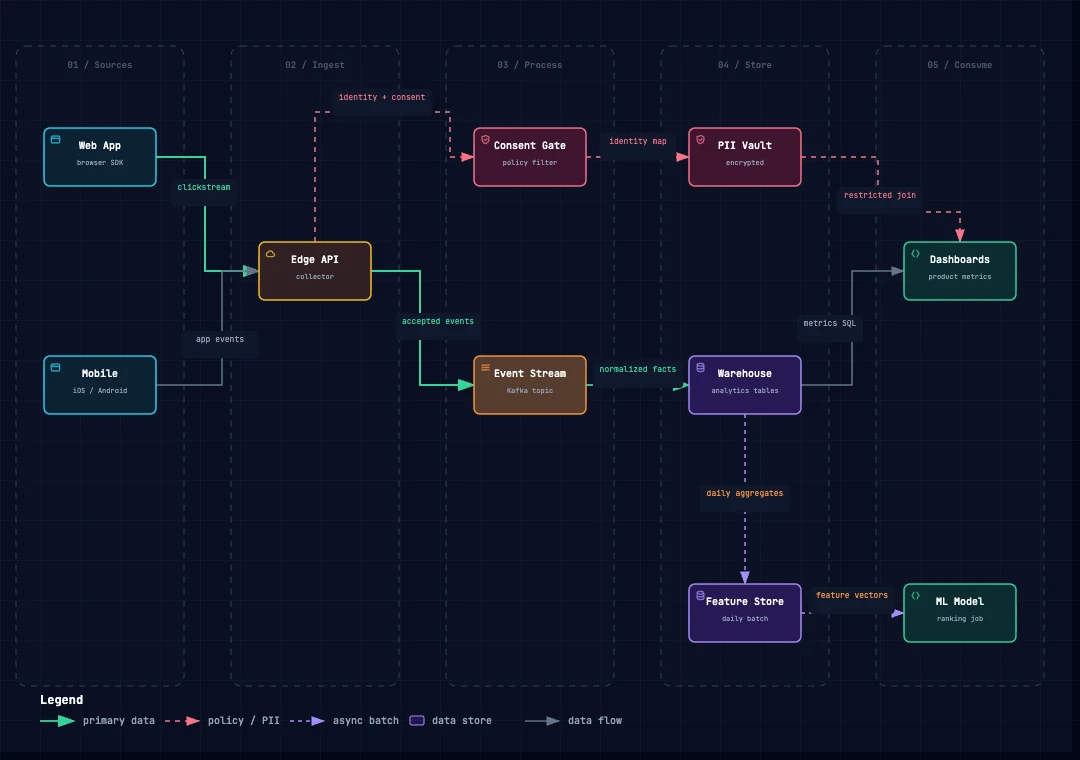
Inspect the current commit. Cite a file and line range only after you open it. Author typed JSON first: 8–12 primary nodes, one main path, short side branches. Do not copy gallery topology. Validate after every edit. Deliver only after validate passes. Then visual-check; screenshots are evidence, not a passed visual review. Disclose unknowns. Where data and events travel, PII, failure paths.
Where does data come from, how is it transformed, and who consumes it?
Use when ETL, analytics, PII, model features.
Don’t use when You need task ownership or a timeline.
Prompt — edit for your repo
Use Archify Dataflow to answer: where does data come from, how is it transformed, where is it stored, who consumes it, and which PII boundaries does it cross?

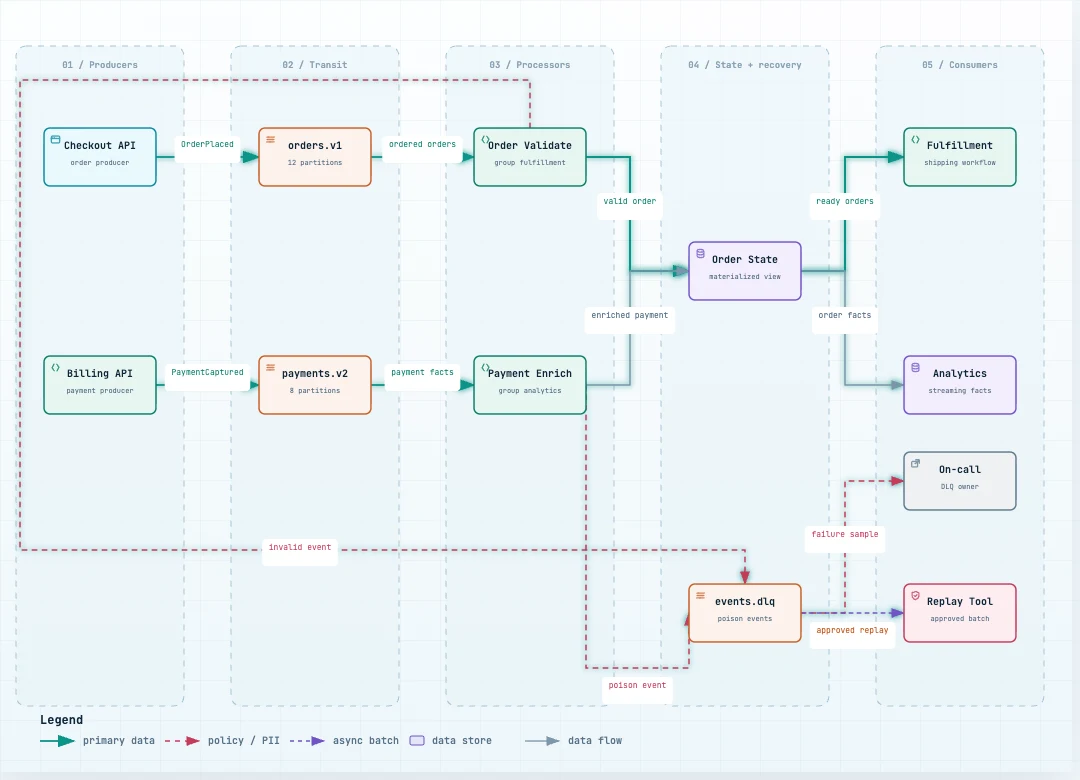
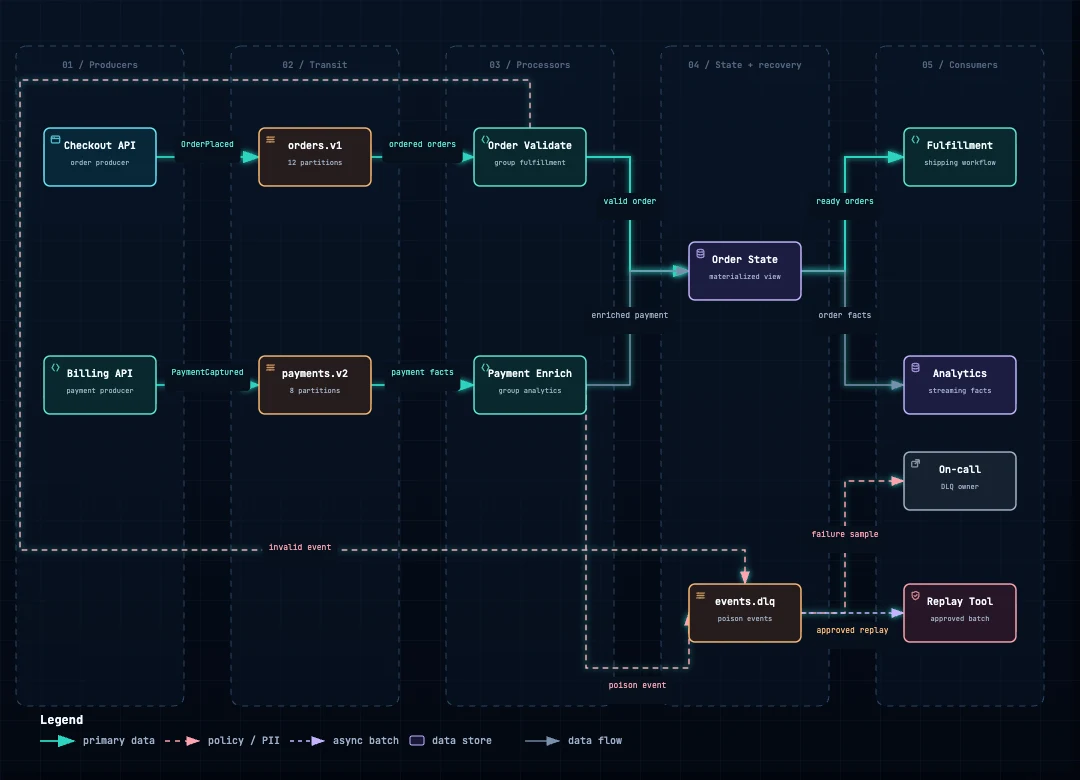
Inspect the current commit. Cite a file and line range only after you open it. Author typed JSON first: 8–12 primary nodes, one main path, short side branches. Do not copy gallery topology. Validate after every edit. Deliver only after validate passes. Then visual-check; screenshots are evidence, not a passed visual review. Disclose unknowns. Which topics, consumer groups, replay paths, and DLQs do events pass through?
Use when Kafka/event platform review, with verified delivery semantics.
Don’t use when Delivery semantics are unverified.
Prompt — edit for your repo
Use Archify Dataflow to answer: which producers, topics, consumer groups, replay paths, and DLQs do events pass through? Record only verified semantics.

Inspect the current commit. Cite a file and line range only after you open it. Author typed JSON first: 8–12 primary nodes, one main path, short side branches. Do not copy gallery topology. Validate after every edit. Deliver only after validate passes. Then visual-check; screenshots are evidence, not a passed visual review. Disclose unknowns. Stored states, transitions, retry/cancel/fail, terminal outcomes.
What states does the object have, and how does it end?
Use when Order, ticket, job, agent run — when state is stored.
Don’t use when You only have execution stages, not a persisted state machine.
Prompt — edit for your repo
Use Archify Lifecycle only when the object has stored state, transition events, retries, and terminal outcomes.

Question: which states exist, how do they transition, how do they end?

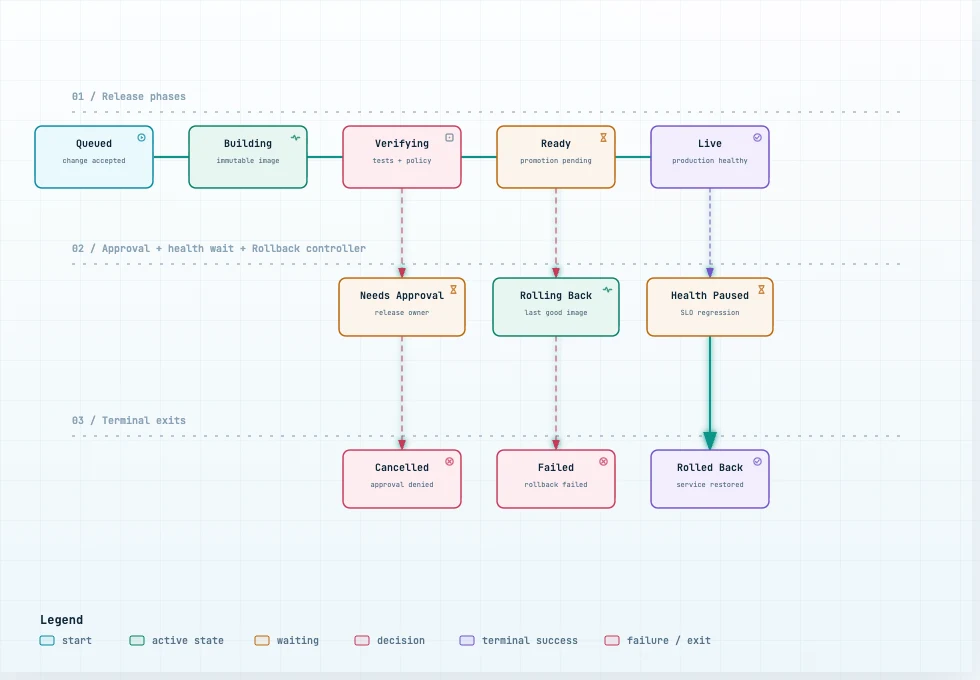
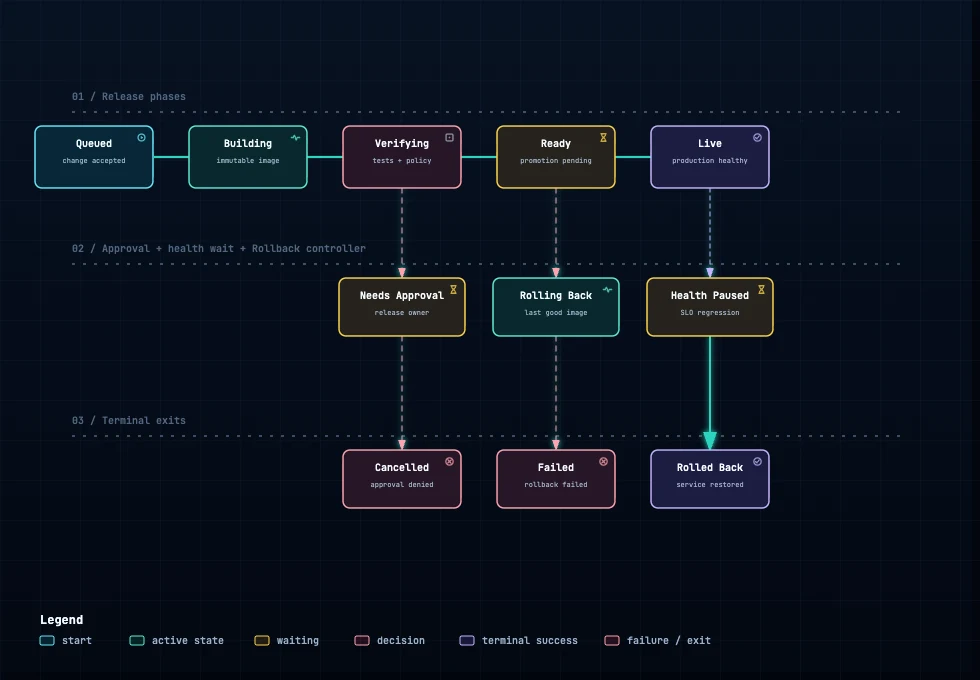
If this is a proposal, not current state, label it Proposed Design. Inspect the current commit. Cite a file and line range only after you open it. Author typed JSON first: 8–12 primary nodes, one main path, short side branches. Do not copy gallery topology. Validate after every edit. Deliver only after validate passes. Then visual-check; screenshots are evidence, not a passed visual review. Disclose unknowns. What state is the release in, and how does it transition?
Use when GitOps, controller, status API.
Don’t use when You need the action order of people and CI — use Workflow.
Prompt — edit for your repo
Use Archify Lifecycle to answer: which states does the deployment object move through for build, verify, approve, promote, pause, rollback, and terminal outcomes?

Inspect the current commit. Cite a file and line range only after you open it. Author typed JSON first: 8–12 primary nodes, one main path, short side branches. Do not copy gallery topology. Validate after every edit. Deliver only after validate passes. Then visual-check; screenshots are evidence, not a passed visual review. Disclose unknowns. SDLC
SDLC (software development life cycle) is the stages of building software: intake, coding, review, release, operations. For any team — not AgentKit-specific. Do not require a diagram on every PR; only when how the system connects has changed.
New project
Build an initial mental model.
Sample prompt
Use Archify Architecture to answer: what parts exist, how they connect, and what sits outside the process? 8–12 boxes, one main path. Only files you opened. Before implementation
Lock one contract — one question, one diagram.
Sample prompt
Use Archify to answer exactly one question before coding: who calls whom in what order, where data goes, or which states an object has? Pick Sequence, Dataflow, or Lifecycle — not more than one. During implementation
Edit the existing diagram, do not redraw from scratch.
Sample prompt
Update the existing Archify JSON for this change. Keep stable IDs. Add, remove, or change only with code evidence. Do not draw a new diagram if topology did not change. PR review
Show what the JSON changed — do not infer impact.
Sample prompt
Use Archify Architecture Delta on this PR. Baseline: the JSON already in the repo. Return exactly added, removed, changed, moved, rerouted. Do not infer impact, risk, or merge safety. Release
One question: the work, or the release object state.
Sample prompt
Use Archify to answer exactly one release question: how a change goes from commit to production, or which state the release is in? Pick Workflow or Lifecycle — not both. Operation
Standardize detect, triage, mitigate, verify.
Sample prompt
Use Archify Workflow to answer: when an incident happens, how do we detect, triage, mitigate, communicate, and verify? One main path; error branches leave it. Onboarding
Cut time-to-read the repo.
Sample prompt
Use Archify Architecture so a new person can see: which parts a request passes through, what sits outside, and the main path. 8–12 boxes. Compliance / data
Where data comes from, how it changes, who uses it.
Sample prompt
Use Archify Dataflow to answer: where data comes from, how it is transformed, where it is stored, who uses it, and where PII crosses a boundary. Only facts you opened. To keep Archify from becoming paperwork: skip renames, internal refactors, tests, formatting, and bug fixes that do not change the contract.
AgentKit
Archify is not an official /ak: skill. Install it, then pause at a review gate in the AgentKit workflows.
Way 1 · Call by skill name
Use the archify skill to create an architecture map for this repo. Way 2 · Slash / $ command
/archify …
/skill:archify …
$archify …
Claude Code / Cursor: /archify. Pi or OMP: /skill:archify. Codex: $ prefix.
Placement rules
AgentKit runs understand → decide → execute → verify → ship. If the repo is unclear, run /ak:scout first. If a plan, debug notes, or PR diff already exists, Archify can use that evidence.
It does not replace /ak:test, /ak:security, /ak:code-review, or human review authority.
Auth, payments, PII, tokens, webhooks, migrations, background jobs, incidents — diagram before locking plan/cook.
Small tasks keep the shortest useful workflow (/ak:cook --fast). Add Archify only when the diagram reduces risk or clarifies a handoff.
A1 · Build a new feature
Unclear shape or multi-file impact. Skip on Quick implement.
Current state
/ak:scout → archify → /ak:brainstorm One Architecture: what exists before choosing a direction.
Chosen direction
/ak:brainstorm → archify → /ak:plan One Workflow or one Dataflow — not both. Then /ak:cook.
Before brainstorm
Use Archify Architecture to answer: for this feature/refactor, which components, dependencies, external services, and one primary request path exist today?

Goal: clear input for /ak:brainstorm. Inspect the current commit. Cite a file and line range only after you open it. Author typed JSON first: 8–12 primary nodes, one main path, short side branches. Do not copy gallery topology. Validate after every edit. Deliver only after validate passes. Then visual-check; screenshots are evidence, not a passed visual review. Disclose unknowns.
After brainstorm
Use Archify to answer exactly one question after brainstorm: which actors does the new work pass through, or where does the new data go?

Pick Workflow or Dataflow, not both. Record changed components, touched boundaries, and open questions. Goal: keep /ak:plan aligned with architecture. Inspect the current commit. Cite a file and line range only after you open it. Author typed JSON first: 8–12 primary nodes, one main path, short side branches. Do not copy gallery topology. Validate after every edit. Deliver only after validate passes. Then visual-check; screenshots are evidence, not a passed visual review. Disclose unknowns. G2 · Auth feature · Payments
Money, PII, tokens, webhooks, access control, or data leaving the system.
Before hard plan
/ak:better-auth or domain skill → archify → /ak:plan One Dataflow (where data goes) or one Sequence (who calls whom). Then cook → security → test.
One risk question
Use Archify to answer exactly one question for this auth/payment/data change: where sensitive data goes and where it leaves the system, or who calls whom in what order?

Pick Dataflow or Sequence. Mark actors, permissions, tokens, webhooks, PII, external providers, and failure paths. Call out uncertain assumptions. Inspect the current commit. Cite a file and line range only after you open it. Author typed JSON first: 8–12 primary nodes, one main path, short side branches. Do not copy gallery topology. Validate after every edit. Deliver only after validate passes. Then visual-check; screenshots are evidence, not a passed visual review. Disclose unknowns. C1 · Fix a bug
The bug lives in retry, queue, async state, or several services. Prefer /ak:fix; deep path when RCA is unclear.
After diagnosis
/ak:debug → archify → /ak:fix One Sequence for the failing interaction. Lifecycle only if the object has stored state.
Failing path
Use Archify Sequence to answer: which participants does the failing path call, in what order, and where do retry/timeout return?

Separate happy path from failing path. Do not turn execution stages into Lifecycle unless state is persisted. Goal: choose the /ak:fix direction before editing code. Inspect the current commit. Cite a file and line range only after you open it. Author typed JSON first: 8–12 primary nodes, one main path, short side branches. Do not copy gallery topology. Validate after every edit. Deliver only after validate passes. Then visual-check; screenshots are evidence, not a passed visual review. Disclose unknowns. D1 · Review a PR · D3 · Ship
Only when the architectural contract changed. Not every PR.
Structural delta
/ak:code-review / /ak:ship Architecture Delta: added, removed, changed, moved, rerouted. Do not infer risk, impact, or merge safety.
Architecture Delta
Use Archify Architecture Delta on the current PR.

Baseline: the validated architecture JSON in the repo. Keep stable IDs for unchanged components. Add, remove, change, or reroute only with code evidence.

Return exactly: added, removed, changed, moved, rerouted. Do not infer blast radius, production impact, risk, or merge safety. Reviewers read the JSON, the receipt, and the rendered delta. Inspect the current commit. Cite a file and line range only after you open it. Author typed JSON first: 8–12 primary nodes, one main path, short side branches. Do not copy gallery topology. Validate after every edit. Deliver only after validate passes. Then visual-check; screenshots are evidence, not a passed visual review. Disclose unknowns.
Don’t
Common habit
One prompt for all five diagrams
Better
Start with Architecture + Workflow. Add a mode only with a new question.
Common habit
A mega-diagram of dozens of services
Better
Cap around 12 primary nodes. Split landscape vs subsystem.
Common habit
Commit HTML only
Better
JSON is the source. HTML is the viewer. Receipts are for audit.
Common habit
Force Deployment Ownership without facts
Better
That profile fails closed without owner/region/crossing. Skip it for a local CLI.
Common habit
Turn execution stages into Lifecycle
Better
download → OCR → package is Workflow. Lifecycle needs stored state.
Common habit
Delete relationship labels to pass layout
Better
Labels carry protocol, action, or contract. Move, reroute, or add spacing.
Common habit
Treat visual-check as human review
Better
Screenshots are evidence. A person still checks main path, boundaries, labels.
Common habit
Set meta.locale: "vi"
Better
Write authored copy in Vietnamese, keep identifiers in English, omit meta.locale. Viewer UI falls back to English.